The following figure shows a process hierarchy of the lorawan-server:
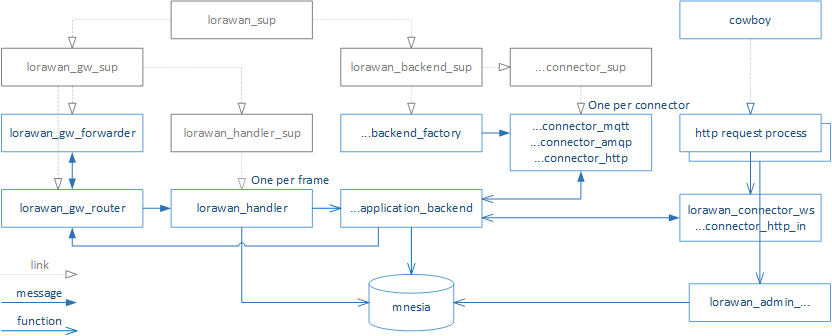
The LoRaWAN communication is handled by the following modules:
- lorawan_gw_forwarder implements the packet_forwarder protocol
- lorawan_gw_router handles communication to multiple gateways. It performs uplink frame deduplication and downlink gateway selection.
- lorawan_mac performs the LoRaWAN frame encoding and encryption.
- lorawan_mac_commands implements the LoRaWAN MAC commands, including ADR algorithms.
- lorawan_mac_regions contains the region specific functions and constants.
- lorawan_handler invokes application modules for uplink processing and provides functions for downlink scheduling. This is the interface between the LoRaWAN layer and the application layer of the server.
The Cowboy HTTP sever starts one process for each incoming each connection:
- lorawan_admin_... modules provide handlers for the REST API. They interact with the mnesia database only.
- lorawan_ws_frames provide handler for the WebSocket interface. The handler joins a pg2 process group corresponding to the request URI.
Using server logs is the most common technique to debug server functions. Please review the lager framework documentation for a comprehensive description.
For example, you can generate log messages by doing the following:
lager:warning("unexpected value: ~w", [Value])The lorawan-server is started as a cluster node lorawan@<hostname>, where
<hostname> is a short hostname of the machine hosting the server. For example,
if hostname --short returns debian, the server runs as a node lorawan@debian.
You can connect to a running lorawan-server by erl -sname test -remsh lorawan@<hostname>.
Once connected you can e.g. use the Mnesia functions
to directly access the server database.
Advanced users can also start the Observer and trace the lorawan-server processes and activities:
erl -smp -sname observer -hidden -setcookie MyCookie -run observerPlease note that nodes allowed to communicate with each other use the same
magic cookie. Make sure that $HOME/.erlang.cookie is the same, or
enter the cookie explicitly by the -setcookie MyCookie parameter.
First, don't forget to release the lorawan-server-api.
Then, create a new tag:
git tag v0.4.0 master
git push origin v0.4.0